Abandoned-cart reminders
Remind customers about the checkout they left — and cancel the reminder if they buy.
- Create a marketing template, for example
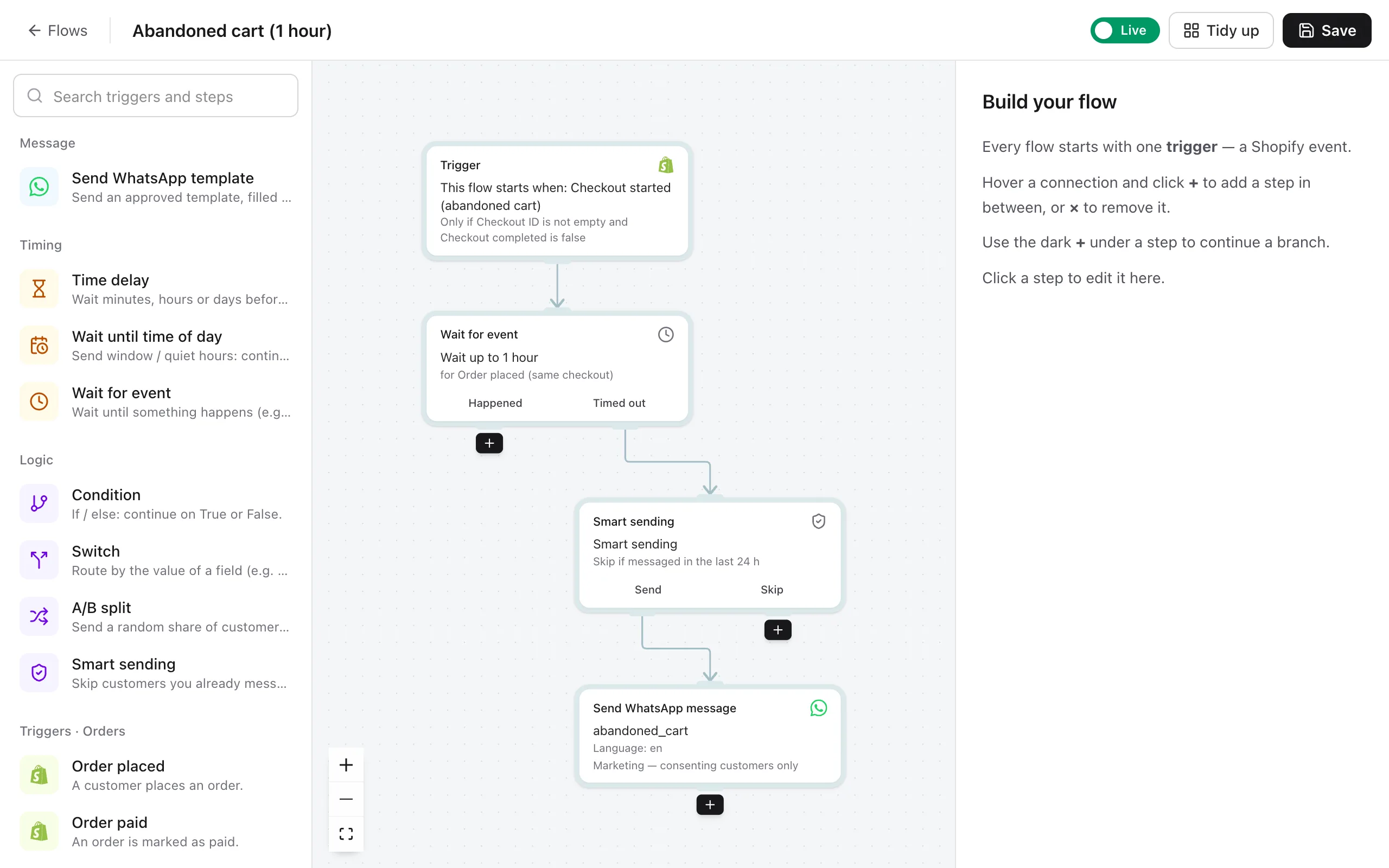
abandoned_cart. Use the variables Customer first name and Cart items with prices, and add a button that links to the Checkout recovery link. Optional: add a Copy offer code button with a discount code. - Open Flows → Create flow and set the trigger to Checkout started (abandoned cart).
- Add a Wait for event step. Set it to wait for Order placed for 1 hour. If the customer orders within the hour, the flow stops here.
- Add Send WhatsApp template on the Timed out path and pick your template. Fill the variables.
- Switch to Live and Save.
Good to know
- Reminders are marketing messages, so they go only to customers who accepted marketing at checkout. Customers can reply STOP at any time.
- Shopify only knows the phone number if the customer typed it at checkout. Ask for the phone number early in checkout to reach more customers.
- One hour usually works best. To send a second reminder after 24 hours, add another Wait for event and Send step.
Still stuck? Contact us — tell us what you tried and what you see, and we'll help you finish the setup.